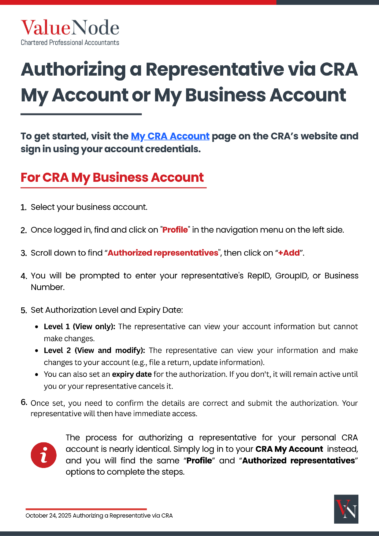
How to Authorize a Representative on CRA My Account
Managing your taxes or business accounts through the Canada Revenue Agency (CRA) can be complex, especially when multiple filings and correspondence are involved. Authorizing a representative allows you to give a trusted accountant or tax professional secure access to your CRA My Account or CRA My Business Account. This makes it easier for them to view and manage your information directly through the Canada Revenue Agency (CRA) portal.
With proper authorization, your representative can securely view, file, and manage your tax information, including corporate income tax, payroll (RP) deductions, and GST/HST (RT) accounts, all while maintaining full CRA security standards. The Authorized Representatives Guide (PDF) provides a clear, step-by-step explanation of how to:
- Locate the “Authorized Representatives” section in your CRA account.
- Add your representative using their RepID, GroupID, or Business Number.
- Choose the appropriate authorization level (view-only or view-and-modify).
- Set an expiry date and confirm your authorization securely online.
This free PDF is designed for individuals and incorporated businesses who want to safely connect their CRA account with a professional representative.